Skip to content


How to manage your iPod using Rhythmbox in Ubuntu

Linux iPod

This tutorial will guide you in using Rhythmbox to manage your iPod in Ubuntu. The steps are specific to Ubuntu Feisty Fawn (7.04) and Rhythmbox 0.10.0.
Note: this post is part of the 10 Alternatives to iTunes for managing your iPod overview.

  1. By default, when you connect your iPod to your computer Rhythmbox will launch. If this is the first time you’ve used Rhythmbox you’ll be taken through a quick setup. If it’s not, you can skip down to step 7.

    Click the Forward button to begin the setup.

  2. rhythmbox ipod
    click to enlarge

  3. Choose the folder you store your music files in by clicking the Browse… button.
  4. rhythmbox ipod
    click to enlarge

  5. Navigate to your music folder and click Open.
  6. rhythmbox ipod
    click to enlarge

  7. Back at the setup window make sure your music folder has been selected and then click the Forward button.
  8. rhythmbox ipod
    click to enlarge

  9. Now click Apply to finish setting up Rhythmbox.
  10. rhythmbox ipod
    click to enlarge

  11. Rhythmbox will open and your music library will be displayed.
  12. rhythmbox ipod
    click to enlarge

  13. To view the contents of your iPod, select it from the list in the left column.
  14. rhythmbox ipod
    click to enlarge

  15. From here you can remove tracks from your iPod by right-clicking (ctrl-click for single button mouse folks) a song (or group of songs) and selecting Move to Trash. To add tracks to your iPod, go back to your music library, select the songs and drag them to the iPod listed in the right column.
  16. rhythmbox ipod
    click to enlarge

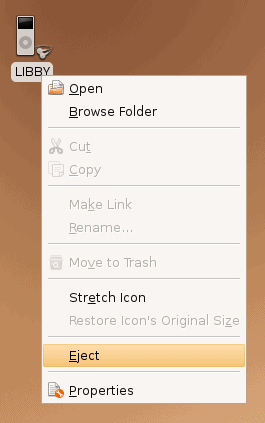
  17. When you’re done updating your iPod and want to disconnect it, close down Rhythmbox, right-click the iPod icon on your desktop and select Eject. Then you can safely remove your iPod.
  18. eject your ipod

Posted in Linux, iPod.

Get Simple Help tutorials just like this one in your email inbox every day - for free! Just enter your email address below:


You can always opt out of this email subscription at any time.

38 Responses

Stay in touch with the conversation, subscribe to the RSS feed for comments on this post.

  1. eBooksBay says

    I’m really beginning to go in Love with Ubuntu.
    And your tutorial + site are just great.
    Dugg

  2. irakli nadareishvili says

    Thank you for a very nice tutorial!

  3. Coconutty says

    After I do step 9 (Right-click iPod icon -> Eject), how do I uneject without physically detaching ipod from computer and then reconnecting?

  4. Delta009 says

    This method doesn’t work : Rhythmbox doesn’t build a database on the iPod, it just reads the content on it. So, the songs you transfer with Rhythmbox are unreadable.

  5. Jaume says

    Thank’s, this gide its great, you are great!

  6. justinf says

    i just tried this – swear to god , it’s actually EASIER than running iTunes on XP.

    it literally is a case of drag’n'drop onto your ipod. amazing stuff.

  7. Davo says

    Are you sure it’s not that the files you’re downloading from the iPod are in Apple’s proprietary format (which won’t generally play elsewhere)?

  8. Jed says

    Another way to eject the iPod is to right click it in the Device List on the left hand Window pane (Eject is one of the options). This has the same effect, but from within the interface.

  9. bob says

    I tried this method with my new nano 3rd generation and it trashed the database. I had to reset the ipod to factory defaults and reload the few songs I had in.

  10. bob says

    Ross,

    Thanks for the info and the quick reply. The instructions on the site you gave me worked perfectly.

  11. Al Stevens says

    When I tried this I can see the iPod fine, I can also cerate a playlist, but I cannot drag and drop anything onto the playlist? Has anyone else experienced this?

  12. Baptiste says

    J’ai beau avoir essayé plusieur fois rien na faire les musique ne veulent pas se mettre sur mon ipod

  13. Jake says

    When I plug my itouch into my computer, it tries to open with f-spot photo manager. When I try to open it with Rhythmbox, it opens rhythmbox but nothing happens. Also, I don’t think my itouch is mounting properly because I do not see the ipod on my desktop.

  14. Ryan says

    Ross McKillop-
    I went to the site you mentioned, but when I try to follow the directions to download the debian files, it says “530 This FTP server does not allow anonymous logins.” What do I do?

  15. Tomas says

    I have tried GTKpod, Amarok, Banshee and Rhytmbox with my Ipod Nano 16 GB on an Ubuntu Jaunty with various success. First, I ahd to turn off the journaling of the file system of the Ipod by using a friends MAC. You have to press the alt key do be able to do this in the disk utility. I had various success with the different media-managers. GTKpod worked really well to start with but always crashed sooner or later, made a mess of things. Although an old fan of Amarok I could not move files between my hard drive and the Ipod (Was not the old version of Amarok more intuitive?) Rythmbox seems to be able to both copy, delete and make playlists (I keep my fingers crossed). Also I spend a lot of time listening to podcasts and Rythmbox can download and transfer my favorite programs OK. I believe that some of the problems I have encountered can be explained by changing between the different media-managers.

  16. dju says

    Rhythmbox me dit qu’il faut avant de commencer quoi que ce soit initialiser l’Ipod, le probleme est que qd je clique sur “initialiser”, le fenetre disparait simplement et rien ne se passe… Pourriez vous m’eclairer sur la demarche a suivre?
    merci beaucoup =)

  17. Yeranui says

    Thank you very much
    This tutorial was very helpful for me. I finally put my songs on my ipod

  18. Ida says

    Anyone have any idea what I do if it doesn’t work to drag the songs? Can’t get this crap into my iPod.

  19. H. says

    when i dragg songs from my music collection to my ipod i get a warning saying something like this:

    warning, can’t open it ‘/media/iPod van Hilad/iPod_Control/Music/F22/Mum – Green Grass Of Tunnel.mp3’: filesystem is only reading

    how can I fix this?

  20. Silvano says

    I just got a new 16Gb Ipod nano (the one that makes movies). I can see its icon in Rythmbox, but it appears empty. That is not the case as it is full of stuff loaded via iTunes. I also tried to drag songs into the ipod icon. Nothing happens. It still looks empty in Rythmbox. Any idea why?

  21. erica says

    am i the only one this doesnt work for =[ idk why i plugged in my ipod and rythmbox never opened on its own… i then opened it myself and my ipod was nowhere on the list on the left =/ this is so frustrating

  22. Gerrie says

    Same here, I can see my iPod in Rhythmbox, but it appears empty – while it is filled with iTunes stuff – and I cannot drag any music to it. Help!

  23. jexeon says

    I selected “safely remove device” and my rhytmbox won’t recognize the ipod afterwards, anything on this?

Continuing the Discussion

  1. University Update - Linux - How to manage your iPod using Rhythmbox in Ubuntu linked to this post on July 3, 2007

    [...] YouTube Link to Article linux How to manage your iPod using Rhythmbox in Ubuntu » Posted at Simplehelp – Common questions, simple answers on Tuesday, July 03, 2007 Linux This tutorial will guide you in using Rhythmbox to manage your iPod in Ubuntu. The steps are specific to Ubuntu Feisty Fawn (7.04) … your ipod Technorati Tags: ipod, rhythmbox, ubuntu, linux, itunes alternative View Entire Article » [...]

  2. Cartoons Fans Lounge linked to this post on July 4, 2007

    [...] 0.10.0. X Men the last stand posterread more | digg story RSS feed for comments on this post. TrackBack URI Cartoons Fans Lounge Syndicate entries using RSS and Comments (RSS). varsc_project=2128341; var sc_invisible=1; var sc_partition=19; var sc_security=”4faa61d0″; [...]

  3. :: Eliax Blog - Para Mentes Curiosas... :: linked to this post on July 4, 2007

    Cómo gestionar tu iPod desde Ubuntu Linux con Rhytmbox…

    A los usuarios de Ubuntu Linux y del iPod los enviamos hoy a una guía que les muestras paso a paso, y de manera visual, cómo gestionar tu iPod desde Rhythmbox. En otras palabras, cómo reemplazar a iTunes en Linux para sincronizar tu música con el i…

  4. Gestire un iPod con Amarok linked to this post on July 4, 2007

    [...] Per dovere di cronaca, e par condicio, linko anche la guida per gestire un iPod con Rhythmbox. PUBBLICITÀ PUBBLICITÀ postato da Fullo il giovedì 05 luglio 2007 in: [...]

  5. Prime News Blog » Blog Archive » xmen porn How to manage your iPod using Rhythmbox in Ubuntu linked to this post on July 5, 2007

    [...] xmen porn This tutorial will guide you in using Rhythmbox to manage your iPod in Ubuntu. The steps are specific to Ubuntu Feisty Fawn (7.04) and Rhythmbox 0.10.0. xmen sexread more | digg story [...]

  6. Cartoons Plugin » Blog Archive » futurama movie How to manage your iPod using Rhythmbox in Ubuntu linked to this post on July 5, 2007

    [...] futurama movie This tutorial will guide you in using Rhythmbox to manage your iPod in Ubuntu. The steps are specific to Ubuntu Feisty Fawn (7.04) and Rhythmbox 0.10.0. futurama adultread more | digg story [...]

  7. How to use gtkpod to manage your iPod in Ubuntu - Simplehelp linked to this post on July 7, 2007

    [...] Plug in your iPod, if it isn’t already. Depending on your current setup, a program such as Rhythmbox or Amarok might launch. If it does, close it down. Launch gtkpod (in Ubuntu do this by selecting Applications -> Sound & Video and then gtkpod) [...]

  8. 10 Alternatives to iTunes for managing your iPod - Simplehelp linked to this post on July 8, 2007

    [...] Tutorial: How to manage your iPod using Rhythmbox in Ubuntu [...]

  9. Linux for Parents - A Beginners Guide to Ubuntu - Simplehelp linked to this post on August 13, 2007

    [...] How to manage your iPod using Rhythmbox in Ubuntu [...]

  10. Munich Unix » How to manage your iPod using Rhythmbox in Ubuntu linked to this post on November 4, 2007

    [...] read more | digg story [...]

  11. Träna Utnubu! » Blog Archive » iPod linked to this post on June 25, 2008

    [...] hittade såhär i efterhand också en bra guide om att använda [...]

  12. تعرف على أوبنتو مشغل الصوتيات rhythmbox « ubuntu in arabic linked to this post on March 7, 2009

    [...] – شرح بالصور لإدارة ipod من رايمبوكس – استخدام الآيبود في لينكس (باللغة العربية) – ubuntu and your ipod (باللغة الإنجليزية) [...]

  13. Who » Gestire un iPod con Amarok linked to this post on March 19, 2009

    [...] Per dovere di cronaca, e par condicio, linko anche la guida per gestire un iPod con Rhythmbox. [...]

  14. HowTo: il tuo iPod su Debian con RockBox « Idl3 Blogger linked to this post on October 20, 2009

    [...] da computer ad iPod e viceversa. Ci sono tante guide su come utilizzare programmi come Amarok, Rhythmbox e tanti altri. Tuttavia, siccome a noi non piace sentirci legati ad un software, vediamo come [...]


Some HTML is OK

or, reply to this post via trackback.