Categories: iPhoneiPod

How to customize your iPhone or iPod Touch with SummerBoard

Share

SummerBoard is an extension to the iPhone and/or iPod Touch SpringBoard user experience. SummerBoard adds a variety of useful and fun features to your iPhone/iPod Touch, including scrolling icons, wallpaper and themes.

Please note: SummerBoard does still exist, but it’s very old and has been replaced by other software. As such, this guide should be considered a ‘historical archive’ rather than something to use in 2020 – unless of course you have a very, very old iPhone.

Get started by installing SummerBoard – if you’re using the iPhone/iPod Touch firmware 1.1.3 or higher, you can use Installer.app. Otherwise, head to the SummerBoard home page and manually install it (instructions are found inside the .zip file).

  1. Once SummerBoard is installed, you’ll have a SMBPrefs button on your SpringBoard

  2. click to enlarge

  3. Select it and from here you can customize your SpringBoard

  4. SummerBoard Preferences

    click to enlarge
  5. One of the first things you’ll want to do is check out some of the themes. Select the Themes entry from the top of the SummerBoard prefs. There are 4 themes included with SummerBoard – Leopard, Louie Mantia, Panther and SummerBoard

  6. click to enlarge

    Default SummerBoard Themes


    Leopard Theme

    Louie Mantia Theme

    Panther Theme

    SummerBoard Theme
  7. To install more Themes, open Installer.app, select Install from the bottom button bar, and scroll down to Themes (SummerBoard).

  8. click to enlarge

  9. From here you’ll have dozens (hundreds?) of themes to choose from.

  10. click to enlarge

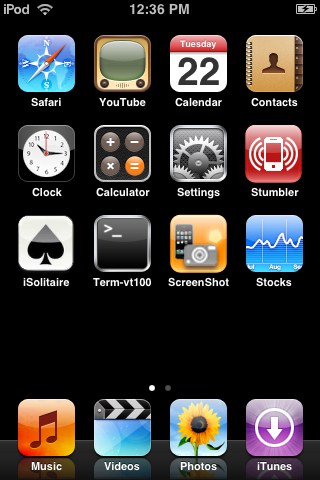
  11. There are a number of other things you can do to customize your SpringBoard with SummerBoard. One is to “Skip Last Row” – which will set your iPhone/iPod Touch to use one less row, increasing the “black” space between your apps and the Dock.

  12. First screen of apps

    Second screen of apps
  13. You can also hide your Icon (app) labels..

  14. click to enlarge

  15. or hide your Dock labels.

  16. click to enlarge

  17. Play around with the various SummerBoard options until you’ve customized your SpringBoard to suit you :)
Published by
Ross McKillop