This walkthrough will take you through every step of installing Microsoft Windows Vista on your Intel Mac (running 10.5 or later), using Boot Camp. It will cover a number of possible errors that you may encounter, and how to get around them. Each time I bring up an error I will explain in detail what you’ll need to do to resolve the issue and continue installing Vista. It’s up to you to decide if it’s worth the time and effort (for example, you may need to completely wipe your hard drive clean and restore from a Time Machine backup). It’s also possible that everything will go perfectly smoothly and you’ll wonder why you even needed a guide.
To change the amount of space to dedicate to Vista, click the small divider between Mac OS X and Windows, and drag it to the left.
The most common error is that OS X couldn’t move a file and the partition could not be created. There are a couple of things that could be wrong, and I’ll outline how to fix them from the fastest method to the longest method. Cross your fingers that the fastest one will resolve your problem.
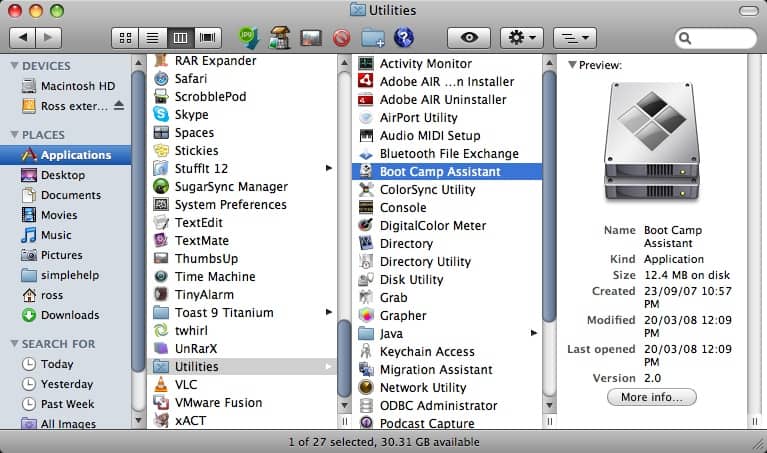
Close out of the Boot Camp Assistant and launch the Disk Utility by selecting Applications -> Utilities -> Disk Utility.
Select your Mac drive, or the partition you were trying to install Boot Camp on (if you have more than one). Click the Verify Disk Permissions button, then the Repair Disk Permissions button. Once that’s done, click the Verify Disk button, then the Repair Disk button if it’s available.
Now go back to step #1 and try it all over again (except you don’t need to print out the PDF twice). If you were able to create the partition, excellent, continue with step #11. If you got the same “can’t move file” error, download and install OnyX. Once installed, launch it (you’ll probably be prompted for your password) and select the Maintenance tab. Click the Execute button and wait.
Once again, go back to step #1 and start all over again. If it worked this time, excellent, proceed to step #11. If it didn’t, you have another couple of choices. Neither is much fun. First, you can purchase defragging software (I’m not aware of any that are free/open source) such as iDefrag and hope that it resolves your problem (it might not). Second – and this is what I opted to do – re-install OS X by formatting the entire drive (all data will be lost), run software update to get all the firmware updates, install Vista via Boot Camp, and then restore OS X from a Time Machine backup. Like I said, not great choices. If you do decide to go the format and re-install route, I’ll outline it with a few more details –
Now click the Drive options (advanced) link/button. Click Format and once it’s done, click OK. Now you can click Next.
And now Vista has finished installing, you’ve setup your “account” in Vista, and you think you’re done. You’re not. Eject you Vista DVD from your DVD drive (if you have problems ejecting it go to the Computer view in Vista, click once on your DVD drive, and then select the Eject link that will show up in the menu. Now pop in your OS X Leopard DVD. You’ll be prompted “Install or run program” – click the Run setup.exe button.


View Comments
Smoooooooth everything worked a treat. Thank you for the step by step. Much appreciated:)
you guy's are o.k , I had no problems following your instructions , and it worked a treat , not unlike the apple site , where you have to go throughout 10 plus hoops and loops , just to be put back to the start at the end of it , so again thank to you guys .... you've made my day .
cheer's .
Frank
Hey just used all your steps even having to wipe my osx due to errors on my partition and it all worked perfectly! Thanks for t he detailed help!
Excellent walkthru! Got me over several bumps and saved me tons of time. Installation went without a hitch (once I repaired the Mac HD which I didn't even know was damaged until boot camp told me it couldn't partition the drive). Thanks!
Thanks for the explanation. I used because I was afraid of errors I could find but it turned out on me that I didn't find any error and I installed a x64 version of Vista on my 21.5 iMac.
By Installing Boot Camp on Windows it installed every single driver on it even that Apple says that only Mac Pro and MBP would get the drivers.
Hi,
Just wanted to say thanks for all your help. I know this must have taken you a bit to go through for us, and it's certainly helpful, and greatly appreciated. Many thanks.
i have macbook vista already now want to go back mac how can i install mac anyone help
Thanks so much for that guide!
Hey thanks for the tutorial!
I was wondering if you could help me out though. After I partition and it restarts to install Vista it just sits there with a black screen and a small white line flashing in the upper left hand corner.
Any ideas?
Thanks again!
EXCELLENT WALKTHROUGH!!!!!!
Worked first time absolutely flawless
Well Done & Thankyou