This brief tutorial will show you how to get GIMP working again in OS X 10.8 (Mountain Lion).
Update: while the steps in this tutorial are still valid, they’re also no longer necessary. The GIMP developers have created a “Native Build” of the GIMP, which means you no longer need to install any additional software in order to use it (and it works in Mountain Lion). Simply visit the GIMP download page and locate the Native Build for OS X. That version comes as a standard DMG, and all you’ll need to do is open the DMG file and drag GIMP.app to your Applications folder.
If you still want to install GIMP using the X11 version, the steps below are still accurate.
Background: OS X 10.8 doesn’t come shipped with X11 anymore, so you’ll need to download an alternative and possibly upgrade your version of GIMP. Here are the steps involved –
- After upgrading to Mountain Lion, when you launch GIMP for the first time, you may get a message asking if you’d like to install X11 now. If this happens, click Cancel.
- Open a Finder window and navigate to your Applications folder. If your “view” isn’t set to “columns” – switch it now (you can switch back to your default as soon as you’re finished this step). Select Gimp in your Applications by clicking on it once. In the ‘next’ column look to see which Version of Gimp you’re using. If it’s 2.8.0p1 or higher, proceed to the next step.
If it’s lower, you’ll need to install an updated version of Gimp – which you can find here. Once you’ve downloaded and updated your version of the Gimp, proceed to the next step.
- Head over to the XQuartz home page and download XQuartz. Open the .dmg file and run the installer package (XQuartz.pkg).
- Click your way through the installation process. At one point you’ll need to enter your OS X password.
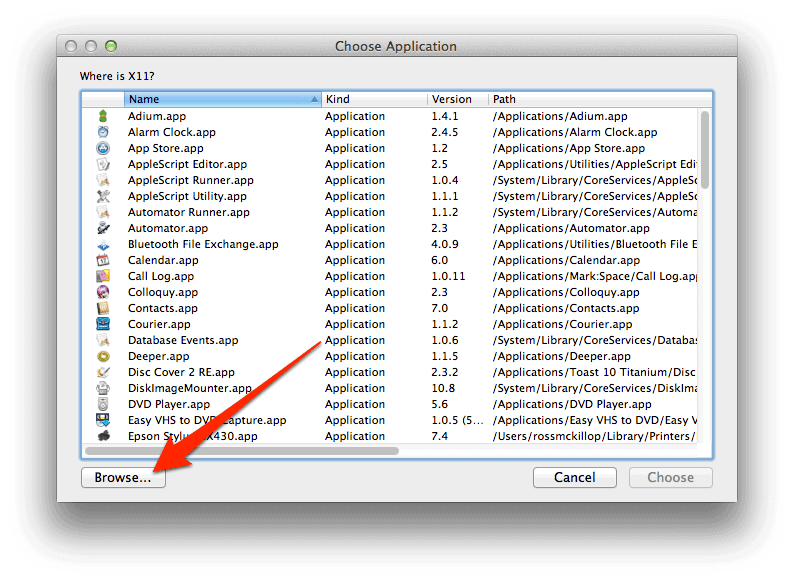
- Once you’ve installed XQuartz, launch Gimp. You’ll be asked to locate X11.app right away. Click the Browse… button.
- Navigate to Applications -> Utilities and select XQuartz. Click the Choose button.
- Gimp will now open, along with your new version of X11. Note: it may take quite a while for Gimp to launch the first time. If it appears as though it has frozen or isn’t going to open – give it a minute.
- That’s it – you’ve got Gimp working in OS X 10.8 (Mountain Lion) now!