This brief tutorial will show you how to use Winamp to manage your iPod.
Note: this post is part of the 10 Alternatives to iTunes for managing your iPod overview.
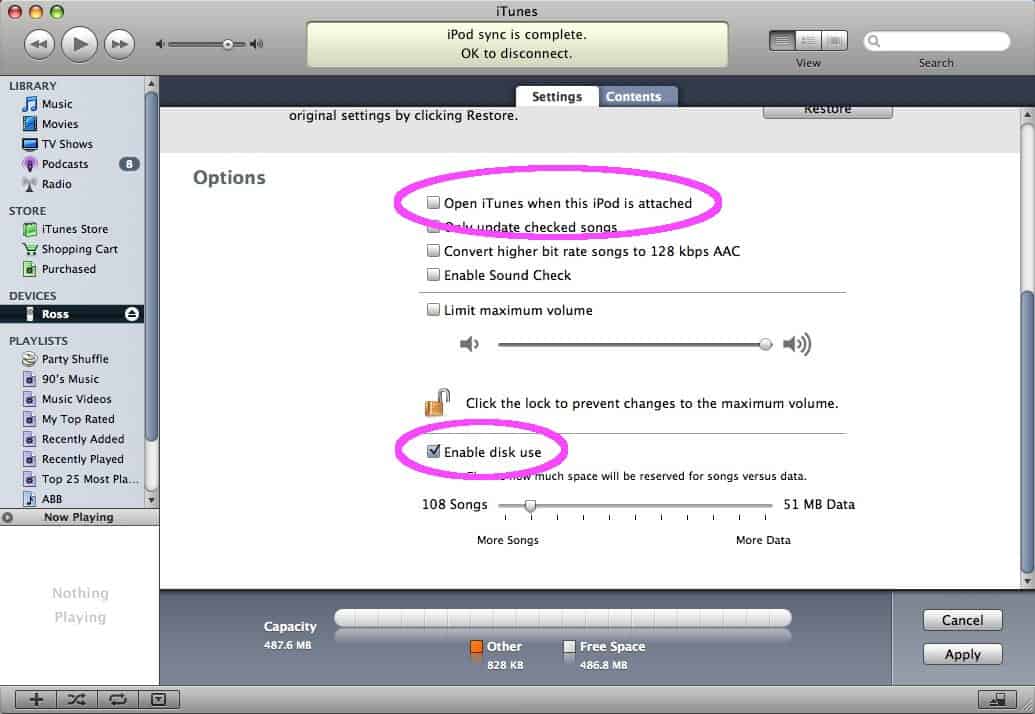
- First, make sure to enable disk use on your iPod by connecting it and opening iTunes (if it doesn’t auto-launch). Select your iPod and then click the Settings tab. Scroll down to the Options section and remove the check from the box labeled Open iTunes when this iPod is attached. Then place a check in the Enable disk use box (if it isn’t checked already). Click Apply.
- Exit out of iTunes, and confirm that your iPod has now mounted itself as a drive.
- Download and install Winamp if you haven’t yet. If you opt to create a custom installation, make sure to leave the iPod support selection in Portable Media Player Support (which is a part of the Winamp Library) checked.
- Launch Winamp and if the Media Library window doesn’t appear, select View and then Media Library.
- In the left column of the Media Library window, select your iPod from the Portables list. Any files currently on your iPod will be displayed.
- To add music to your iPod, open the Playlist window, add some songs to it and then right-click those songs. From the pop-up menu select Send to: and then choose your iPod.
- You’ll see a percentage status indicator as the files are sent to your iPod.
- The files listed on your iPod may not refresh on their own. Just click Portables…
- … and then click your iPod again. All of the files you just sent to your iPod will now be listed.
- You can eject your iPod right from within Winamp by clicking the Eject button in the bottom right corner of the Media Library window.



Pingback: IPod: Manage your music with Winamp
Pingback: HiWired Blog
Pingback: » IPod: Manage your music with Winamp
Pingback: tits » Blog Archive » IPod: Manage your music with Winamp
Pingback: Techzi » Blog Archive » IPod: Manage your music with Winamp
Pingback: iPod: Manage your music with Winamp at H4CKER.cc
Pingback: IPod: Manage your music with Winamp : Teknicks Blog
Pingback: 10 Alternatives to iTunes for managing your iPod - Simplehelp
Pingback: Winamp to manage your iPod at Scattered
Pingback: Manage Your Music with Winamp « vashNYC: the 60 billion $$ man
Pingback: Nixz News Ep13 : ????? ?????????????? (??? Dota)
Pingback: Deus Ex Machina
Pingback: iPod mit Winamp verwalten - Tobbis Blog - Aktuelles über Windows, Opera & Co. gebloggt von Tobias Steinicke
Pingback: Utilidades para el iPod bajo Windows
Pingback: Tecnologia » Blog Archiv » Utilidades para el iPod bajo Windows
Pingback: Blog de software » Blog Archive » Utilidades para el iPod bajo Windows
Pingback: Blog » Blog Archive » iPod mit Winamp verwalten
Pingback: Software para Windows para tu iPod | JL Escobedo :: José Luis Escobedo´s Blog
Pingback: Utilidades para iPod bajo Win « PerikuLog
Pingback: My Ghillie » How to use Winamp to manage your iPod - Simplehelp
Pingback: 2 « My Weblog
Pingback: Come gestire il tuo iPod con Winamp at Stormy Monday Blog
Pingback: Best software for ipod... - IH8MUD.com Forum
Pingback: gift horses and their mouths — Luke ‘n’ Kim
Pingback: Manage your music with Winamp
Pingback: iTunes x Winamp « Moo.
Pingback: Tagz | "How to use Winamp to manage your iPod - Simplehelp" | Comments
Pingback: Glorf IT - Bedenkliches aus dem IT-Alltag » iPod-Erfahrungen (3): Anleitungen zum Fremdgehen
Pingback: I haven't figured it out... Yet!
Pingback: Ipod auch für Winamp
Pingback: Wholesale Cheapest Products • Blog Archive • Maybe it will be your choice
Pingback: Free Software Part Four: Windows Media Player Alternatives, QuickTime Alternatives, Real Player Alternatives | Online Marketing & Internet Business News
Pingback: Free Software Part Four: Windows Media Player Alternatives, QuickTime Alternatives, Real Player Alternatives | Brionglóid Media Blog
Pingback: Blog » Archive » iTunes x Winamp
Pingback: WINAP | Materials Find
Pingback: Utilidades para el iPod bajo Windows | TecnoApps.net
Pingback: IPod: Manage your music with Winamp | SHOCM