Skip to content


How to repair disk permissions in OS X

Mac

If you find your Mac is running a bit more sluggish than usual, or a program you frequently use starts behaving oddly, you might need to repair your disk permissions. This tutorial will guide you in doing just that.

  1. Open the Disk Utility by selecting Applications -> Utilities -> and then Disk Utility.

  2. click to enlarge

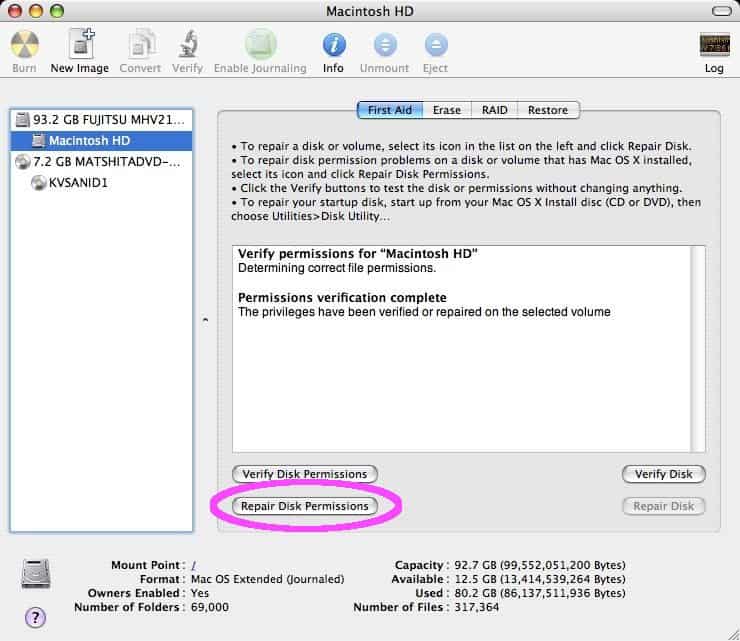
  3. Select your primary hard drive (the one that you loaded OS X on) and then click the Verify Disk Permissions button.

  4. click to enlarge

  5. Disk Utility will check your drive for any permission errors. In the example screenshot below there are none (I run this program a couple of times a month) – but you may find a screen full of errors. If any errors do appear, click the Repair Disk Permissions button.

  6. click to enlarge

  7. When its finished, you can view everything that was detected and fixed by clicking the Log button in the upper right corner.

  8. click to enlarge

Posted in Mac.

Get Simple Help tutorials just like this one in your email inbox every day - for free! Just enter your email address below:


You can always opt out of this email subscription at any time.

4 Responses

Stay in touch with the conversation, subscribe to the RSS feed for comments on this post.

  1. kalbazs says

    I believe it’s better to run Disk Utility from your Install Disc. When I’ve run Disk Utility from my HD, and then immediately after run it from my Install Disc, I found and fixed errors that my HD created.

    No need to verify disk permissions first. Just run repair straight off. DU won’t repair anything that doesn’t need fixing, and youe save a little time. Same goes for Repair Disk.

  2. stefano solinas says

    Repair permission, if you are not desperate, don’t seems a good idea.
    Repair permission set all the permission as your system thinks they have to be, if you install any program that modify that (probably like little snitch, fan control or any problem that control system parameter) could have a lot of problem after that.
    I hope macos will give the opportunity to selective permission repair in the next version.
    In your screenshot all the problem comes from flash player, does it makes any sense to you?

  3. dayane says

    oi alguem pode me ajudar? tenho o macbook pro ja faz anos adoru, mas nao sei o que esta acontecendo! sempre eu abaixo filmes, musicas, seriados mas esta muito lento antes carregava em 3min se fosse ate 9min agora demora ate 4horas o que fazer? alguem pode me ajudar ja fiz esta reparaçao ai mas nada! socorroooo por favor me ajude obrigado

Continuing the Discussion

  1. OS 10.5 - kernel panics - Mac-Forums.com linked to this post on June 26, 2009

    [...] start with some basics and go from there. Have you repaired the disk permissions? What did you install just before you noticed these random errors? Is there anything that you do [...]


Some HTML is OK

or, reply to this post via trackback.