Have the icons (called favicons) next to your bookmarks in Firefox suddenly disappeared? This guide will help you get them back :)

Fortunately, this issue is probably going to be an easy fix. A number of users, myself included, recently had this happen. There are a couple of possible solutions, and we’ll go over them in order of their likeliness to resolve the problem.
- The first is to make sure you’re using the latest version of Firefox, and if not, update it. To do so, click the “Open menu” button from the upper-right corner of Firefox (the button with ‘3 dashes’ on top of each other, see screenshot below) and select Options from that menu.
- Scroll down to the section titled Firefox Updates. If you see a button titled Restart to update Firefox that means you’re not running the latest version but it’s ready to be installed – so give that button a click.
- If you don’t see a Restart button, click the Check for updates button. Make sure that you see the notice Firefox is up to date after you check for updates.
- If you’re using the latest version of Firefox and the issue still persists, try clearing the Firefox cache.
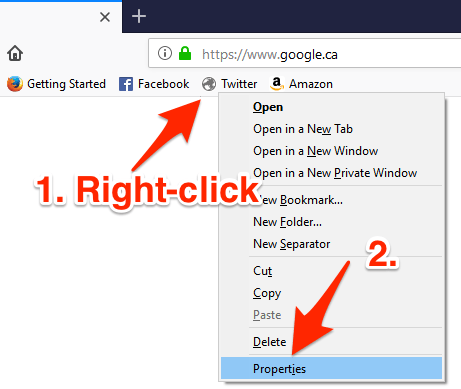
- If some of the favicons have returned and others haven’t, you may need to manually edit the ones that aren’t displaying properly. Right-click one with a broken favicon and select Properties
- In the Location: field, look to see if the http part of the URL has an “s” at the end, so that it’s https://
If it doesn’t, try adding an s to the http:// part of the address, so that it reads https://
- After you’ve switched the address from http to https, you may need to ‘click’ that bookmark again for the favicon to load.