Skip to content


How to emulate every Nintendo system in Windows


Windows

The following list will guide you through how to play NES, SNES, Nintendo 64, Nintendo GameCube/Wii, Nintendo Gameboy/Color/Advanced, Nintendo DS AND Nintendo Virtual Boy games on your Windows PC.

NES


click to enlarge

There are many NES emulators, but Nestopia is my favorite. It is open source and is still being worked on. It plays all the games I’ve tried, it works with my gamepad, and has some advanced options. It even supports multiplayer over the Internet! Download Nestopia here.

SNES


click to enlarge

ZSNES is a great emulator, the interface is weird, but it works great. A tip I wish I knew a long time ago is that when you have you mouse in the window, you can hold the right mouse button to move the window. You can read a great tutorial about ZSNES here and download the program here.

Nintendo 64


click to enlarge

Project64 has been working on their 64 emulator for a very long time. You can get the beta (1.7) if you donate, but the stable 1.6 is free and great. The only problem I have with Nintendo 64 emulation is that it’s hard to emulate an N64 controller, but that isn’t Project64’s problem. You can download it here.

Nintendo GameCube/Wii


click to enlarge

Dolphin is the only emulator I know of for GameCube or Wii games. I was surprised to find that Super Smash Brothers Melee was going at a playable speed. Dolphin is updated weekly and seems to be progressing well. It comes in both 32 bit and 64 bit applications, which you can download here.

Nintendo Gameboy/Color/Advanced

All of these emulators are rolled into one package with Visual Boy Advance. It has not been updated since 2005, but it works great. One nice feature is that it can play roms that are still in a zip folder. So there is no need to unzip. Something you may want to look out for is Visual Boy Advance-M, which plans to improve upon VBA. For now, you can download VBA from here.

Nintendo DS

I had problems with this. DeSmuME worked the best, but I tried iDeaS and it had some problems too. I only tried this with one game, but I have been told DeSmuME is slightly better.

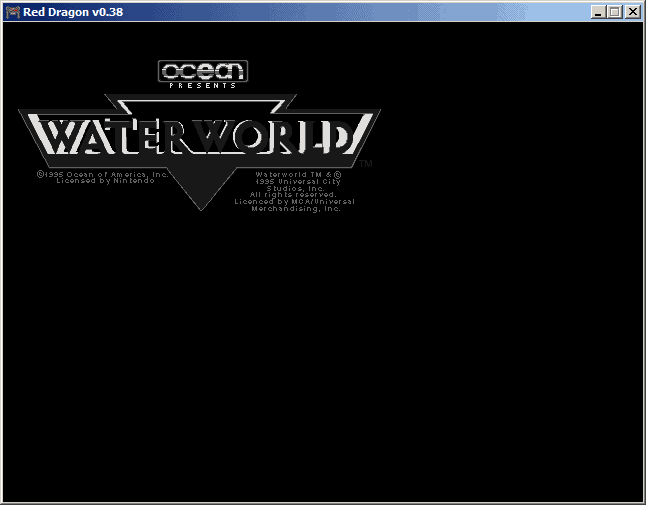
Nintendo Virtual Boy

click to enlarge

Oh come on. Why would you want to do that to yourself? Red Dragon is probably the best we’re gonna get. There is little to no interest in emulating this failure. Download it here, if you must.

Posted in Guest Blogger, Windows.

Get Simple Help tutorials just like this one in your email inbox every day - for free! Just enter your email address below:


You can always opt out of this email subscription at any time.

27 Responses

Stay in touch with the conversation, subscribe to the RSS feed for comments on this post.

  1. George says

    its funny, you told everyone what programs can be used to emulate old games, but you told nobody where to get the roms! rom-world.com

  2. Whammo says

    You can get the roms from any torrent site. Don’t waste your time downloading each rom separately at rom-world and being subjected to countless ads.

  3. Jimmy says

    no$gba is best for ds games

  4. Mike says

    Hello. Thanks, this is awesome

  5. Rob says

    An N64 controller is easy to enmulate using a PS2 style controller. Map your C buttons to the right analog stick. I have been using a PS2 controller for N64 for years.

  6. jimbo says

    how do i get the cartridges (currently in boxes in my attic) into my computer? there are only a few games i would be interested in emulating and i already have the game cartridges…

  7. Freezer says

    Seconding No$GBA for DS emulation. It can even play at reasonable speeds on older computers. If they’d get the save states working properly, it’d be near perfect.

  8. Nate says

    For $10 you can get a usb adapter that allows you to plug in either an n64 or ps1/2 controller. I bought 2 and it works great!

  9. IheartEmus says

    I found a site which offers frequently updated builds of Dolphin revisions as well as other Downloads. It’s a legal emulation website however, so you won’t find downloads for game roms, iso’s, bios’s, firmware or other copyrighted material.

    I am a member on their forums, which I use whenever I need support with an emulator and have a problem. They are very snappy with support responses and are quite laid back unlike some other emulation communities I’ve joined in the past.

    Yo can grab Dolphin builds here: Dolphin Builds

  10. Anon says

    It’s a good guide. I’d like to see one for ubuntu as well.

  11. saitokthx says

    >.> wow.. i’ve used all those emu’s except virtual boy =\

    im a geek!

  12. Anon says

    lulz virtual boy

  13. Corey says

    Yeah, I third No$ for the DS emulator, but the only issue I had with it is that the window is not resizeable. There’s a small hack for it that doubles the window size, but greatly reduces the playing speed and causes some small glitches.

    Nothing’s perfect, however.

  14. marco says

    > jimbo ‘how do i get the cartridges (currently in boxes in my attic) into my computer? there are only a few games i would be interested in emulating and i already have the game cartridges…’
    To do so you need an adapter? to read out the cartridges and make roms out of them. It is easier to use the internet to look for the roms of the games you have. Because you have the original cartdriges, it is legal. :)

  15. JonBoy Online says

    I have tried and tried but never had much success with Gameboy emulators.
    Its easier playing the Ds with something like a m3DSreal.

  16. DIY ROM Arcade says

    Nice article. Thanks for the good suggestions on different Emulators, and great screenshots btw.

  17. jonesy says

    even though EVERYONE hated the Virtual Boy, i actually liked it, when it got scrapped, i was able to pick up every game for it for a buck at kb toys and the system itself for like 5 bucks.. i was so happy :P

  18. Red Eyes says

    i second that no$GBA is best EMU for DS and GBA in one program.

  19. Alie says

    WHat about wii?

  20. Brett says

    Can anyone help? I got a N64 to USB controller adaptor, it works perfect in control panel test, but wont work in emulator. I tried the different controller plug in – still no joy. Any clues, need to play PILOT WINGS 64!!

  21. Chris says

    Project64 < Mupen64Plus

  22. pc arcade games says

    hey thanks for the share, ive been lookin for this emulator for awhile now with no luck, and then i stumble this site and there it was.

Continuing the Discussion

  1. Play Your Favorite Old-School Games in Emulation - Softsaurus.org linked to this post on December 29, 2008

    [...] over 2000 games in Firefox and how to emulate the NES on your mobile phone. Photo by Hamish Duncan. How to Emulate Every Nintendo System in Windows [...]

  2. Go Retro: Emulate any Nintendo Game :: TinyHacker linked to this post on January 9, 2009

    [...] How to emulate every Nintendo system in Windows – Simple Help Categories: Downloads. Tags: emulators, fun, games, nintendo. [...]

  3. Monday’s Link Roundup 1/12 | Dallas McLaughlin linked to this post on January 12, 2009

    [...] Nintendo Emulators – How to play every Ninetendo system on your computer. [...]

  4. Play Your Favorite Old-School Nintendo Games on Your Computer [Emulation] - BinaryImpact linked to this post on January 19, 2009

    [...] out FireNES to play over 2000 games in Firefox and how to emulate the NES on your mobile phone. How to Emulate Every Nintendo System in Windows [SimpleHelp] :Emulator, Microsoft, N64, NES, Nintendo, SNES, Video games, Windows No comments [...]

  5. [08/01] Keynote da Microsoft, nova cara (número 793) da TeiaCast e Graveheart com boas dicas! | Blog de Eduardo Moreira linked to this post on August 30, 2009

    [...] segundo post vem do site SimpleHelp.net, que mostra como você pode emular todos os videogames da Nintendo em um PC com SO Windows. No site (em inglês) se descreve todas as plataformas disponíveis, com links para downlodas dos [...]


Some HTML is OK

or, reply to this post via trackback.
