

This overview details the features (with screenshots) of 10 different programs other than iTunes to manage your iPod. Tutorials are included for every program, and they’re all either free or Open Source.
| Name | Supported Platforms |
| Amarok |  |
| Banshee | |
| gtkpod | |
| MediaMonkey |  |
| Rhythmbox | |
| SharePod | |
| Songbird |  |
| Winamp | |
Amarok
Homepage: http://amarok.kde.org/
About: Amarok includes the following features: Album cover detection and downloads, lyrics support, wikipedia integration, contextual information (a quick view on your currently played music, and suggest similar track which you might like), statistics, Last.fm integration, multiple media devices support (Apple iPod, iRiver iFP and T players, Creative Zen and Nomad players, Generic USB players, Generic MTP players). Amarok is available as a pre-compiled binary for many Linux distributions, and its source is available for those of you who prefer compile your own programs.
Tutorials: How to use Amarok to manage your iPod in Ubuntu
How to install Amarok in Ubuntu (and get it to play MP3s)
Screenshots:
 configure iPod |  iPod contents list |
 transfer queue |  transfer to iPod |
Banshee
Homepage: http://banshee.fm/
About: Banshee includes the following features: Rips music, burn CDs, share your music, displays cover art, tons of plugins, controllable via keyboard shortcuts, smart playlists and the ability to rate your music. Banshee is available as a pre-compiled binary for many Linux distributions, and its source is available for those of you who prefer compile your own programs.
Tutorial: How to use Banshee to manage your iPod in Ubuntu
Screenshots:
 main Banshee window |  highlight files |
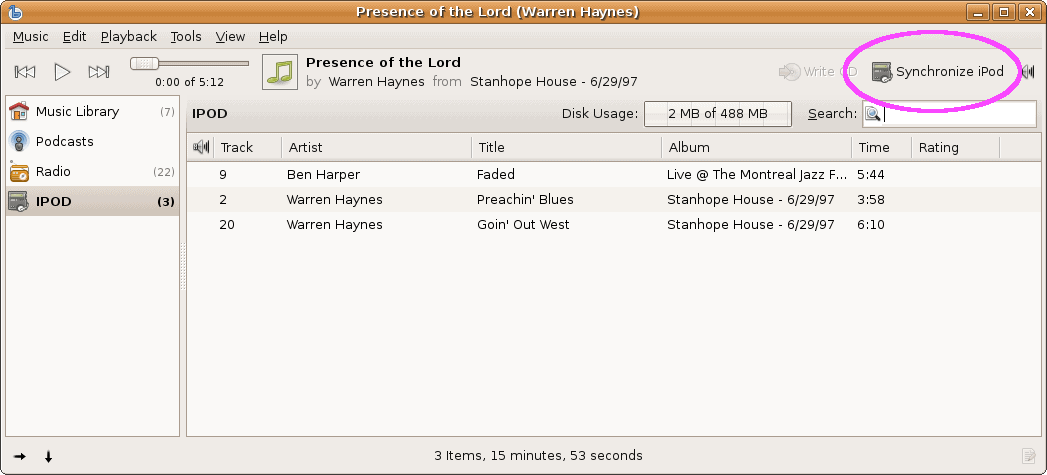 sync to iPod |  sync in progress |
gtkpod
Homepage: https://sourceforge.net/projects/gtkpod/
About: gtkpod is a platform independent Graphical User Interface for Apple’s iPod using GTK2. It supports the first to fifth Generation including the iPod mini, iPod Photo, iPod Shuffle, iPod nano, and iPod Video. gtkpod includes the following features: Read your existing iTunesDB, add MP3, WAV, M4A (non-protected AAC), M4B (audio book), podcasts, and various video files, view, add and modify cover art, sync directories, detect duplicates when adding songs, and much more.
Tutorial: How to use gtkpod to manage your iPod in Ubuntu
Screenshots:
 main gtkpod window |  adding files with gtkpod |
MediaMonkey
Homepage: http://www.mediamonkey.com
About: MediaMonkey (free version) includes the following features: Party Mode/Auto-DJ, CD Ripper, audio converter, auto-renamer, album-art lookup, reports and statistics, iPod and MP3 Player support.
Tutorial: How to use MediaMonkey to manage your iPod
Screenshots:
 MediaMonkey artist view |  transferring to iPod |
 tracks on iPod |  safely eject iPod |
Rhythmbox
Homepage: https://wiki.gnome.org/Apps/Rhythmbox
About: Rhythmbox is an integrated music management application, originally inspired by Apple’s iTunes. It is free software, designed to work well under the GNOME Desktop, and based on the powerful GStreamer media framework. Rhythmbox includes the following features: an easy to use music browser, searching and sorting, comprehensive audio format support through GStreamer, Internet Radio support and Playlists.
Tutorial: How to manage your iPod using Rhythmbox in Ubuntu
Screenshots:
 Rhythmbox library |  iPod library in Rhythmbox |
SharePod
Homepage: https://getsharepod.com/
About: Sharepod has changed significantly since this guide was created. The screenshots and overview are no longer valid, and have been removed. However, it is still an iTunes alternative – so I’m leaving it in this list.
Songbird
Homepage: N/A
Unfortunately Songbird no longer exists.
Winamp
Homepage: http://www.winamp.com
About: Winamp includes the following features: frankly there are too many to list, so visit their features page. It does pretty much anything you can think of. But I don’t think Winamp supports cover-art – unless there’s a plugin for it, which there probably is. Winamp has been my default media player in Windows since 1997 (it finally replaced Winplay3). As a completely unrelated but ‘fun’ side note, the very first version of ICY for Linux (now known as SHOUTcast, the streaming audio software) was compiled on my computer because Justin didn’t have a Linux machine at the time.
Tutorial: How to use Winamp to manage your iPod
Screenshots:
 portable MP3 players in Winamp |  iPod view |
 send files to iPod in Winamp |

I am fedup with iTunes. So I decided to look for an alternative and so far I’ve been pretty diappointed. I am a very visual person and I love colours. All these alternatives look the same as iTunes. Is there no one out there with a bit of imagination. They almost all have one thing in common. Black & White. I would love to take control of my music platform. Change the background colour to what ever I want and change the font to any colour I want and where I want. I want to have a different colours for each of my playlists etc etc etc. So come on you techies, pull your finger out and do something that stands out rather than the OLD BORRRRING BLACK & WHITE itunes
Amazing! Some of the alternatives are still working with my iPod
Sweet, a lot of these still work!
Great list
Thanks a lot! You know I also bought Media Monkey last year because I had iPod issues, but once that was resolved I never got to use it properly. I’ll give it a try. Hopefully it won’t go away like Winamp or MusicMatch..I sure can pick them. Lol
Good job! I came upon this originally because i wanted an alternative to iTunes.
I have been having trouble with iTunes not putting all of my songs onto my iPod from my computer. So I got online to search for an alternative solution to my problem. I found your website, followed the instructions to use Winamp, and it worked great.
Thank you for taking the time to set up this site and do your homework so to speak
Just wanted to say that Floola is awesome, since you couldn’t test it yourself. It’s incredibly simple, and has an awesome plug and play, drag and drop feature. Haven’t had any video or audio conversion issues yet, and my ipod is running great.
Just to have a simple site that allowed me to drag and drop songs, videos etc and back to my PC would be great, I’m sick of logging onto to i tunes only to find half of my songs with exclamation marks by them even though they were obtained legally!!?? I’m always worried about syncing my i pod in case I lose half of my songs!!
Does any of these programs allow you to transfer in playlists from iTunes? I lost my gift iPod and won’t pay for one, but I’d hate to have to remake my brilliant and irreplaceable playlists. I’m thinking a Sansa for my new player, but I really want one that’s easy to connect and use.
would any of these alternatives that you listed work with an ipod shuffle 4th generation (2GB)? all i want to do is put music on it in the most simplest way with out iTunes..any suggestions?
good
I have been having trouble with iTunes not putting all of my songs onto my iPod from my computer. So I got online to search for an alternative solution to my problem. I found your website, followed the instructions to use Winamp, and it worked great. Thank you for taking the time to set up this site and do your homework so to speak.
I would simply like to see the iPod as a drive so I can simply copy my MP3s to/from it as with any other MP3-player. Nothing simpler than that. No software necessary at all.
winamp is brilliant and i think its better than itunes. Especially if you download from toplist.fm (free no surveys etc)
Just tried Sharepod, excellent!
Thanks so much.
Copied 14GB, around 3000 songs from my ipod to my laptop in about 30 mins!
I feel so much safer.
This websiite is amazing., thanks noow i didnt have to download itunes :)
I just went across this article. Even if time has passed since the first post, such tips are still useful
I have been having trouble with iTunes not putting all of my songs onto my iPod from my computer. So I got online to search for an alternative solution to my problem. I found your website, followed the instructions to use Winamp, and it worked great. Thank you for taking the time to set up this site and do your homework so to speak.
Janet
this article is just GREAT. I started using Winamp and comparing to itunes, it is sooo easy and efficient to use. i have been trying to transfer some music to my ipod with itunes for the last 4 hours, till i come up with this article.
Hiya,
I have just got an ipod and HATE itunes.
I am wondering what programme you recomend to manage my ipod. I have 4000 songs on my ipod and i have deleted them off my pc as they where taking up too much room, so obv i need a prog that wont delete them off my ipod, but something easy to get mainly music and videos on it. any ideas whats best before i crack up :p
Many thanks for these alternatives! I bought a new iPod Classic (120 GB) yesterday and then couldn’t get iTunes to work!?! Many other programmes couldn’t even detect the iPod when it was connected to the computer. Then I used Google and came to this webpage. I tried Floola to no avail then I tried MediaMonkey and POW! It works perfectly. So happy now. Thank you very much indeed. :-)
Can someone please tell me (besides itunes) which software will transfer photos and video to my ipod? thank you so much.
tried gtkpod, works amazing.. thnx alot.
Anapod is GREAT! Does cover art etc. Pretty much does everything I need.
Great article, you ROCK!!!
tnx
Big thumbs up for Sharepod. It’s ideal for people who just want to manually move tracks from PC to iPod and back again. It makes an iPod as easy to copy files as a plain old USB PMP or a PFS PMP. And zero install with Sharepod on the iPod Disk area is the icing on the cake. The one catch is when your iPod ends up in Sync mode after being removed without being ejected. You need iTunes to clear the flag.
Maybe I’m weird (probably) but I don’t want sync. I just want to drag and drop individual directories and files. The classic problem is Y Gb of music on your PC and only X Gb available on your iPod. It’s horribly laborious to define 300 sync folders out of your 500 on the PC in almost every ipod management software. And especially in iTunes.
Big thumbs up also for Winamp. Such a shame there isn’t an exact clone of Winamp 5 Pro on Linux. Or alternatively that Winamp 5 Pro ran under WINE. Amarok is neat but it’s persistently buggy. And after 10 years of Winamp some of the features seem odd and counter intuitive.