

This guide will show you how to resize a group of images all at the same time (called “batch resizing”) using completely free software for Windows.
- To get started, download and install the free Fast Image Resizer for Windows (it works in Windows XP all the way through to Windows 10) . It’s a very small app and the installation will take less than a minute. Once it’s installed, launch it from your Start menu. Click the Options button to set your preferences.
- From here you can choose the file type you want the resized images to be (JPG, BMP or PNG), increase or decrease the quality of those resized images and more. You can also specify how you want the files saved – in the same folder as the originals, in a subfolder of the images (which is the default), or in a specific folder of your choice. Review the other options and make changes as you see fit, then click the OK button when you’re done.
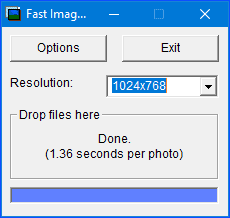
- Now select the Resolution size for the files you’re going to resize. Finally, drag some image files from Windows Explorer to the Drop files here area of Fast Image Resizer. NOTE: if the resolution you want to resize your images to isn’t listed, jump down to step #6.
- And your files will be resized, which will only take a few moments.
- Once it’s done, you’ll get a little summary of how long it took. Locate the new files and check to make sure they’re everything you had specified etc.
- To add a custom resolution size for your images, click the ‘drop-down’ menu next to Resolution: and select Edit List… from the list.
- Enter the resolution size you want to use in the format of widthxheight and then click the Add button. Once it’s added, that resolution will be available for you to use going forward.




Now you can batch resize images in Windows! If you ever need to do the same thing in macOS, we’ve got a guide for that too!

