Even though Windows XP hasn’t been supported by Microsoft for quite some time, it’s still in use in a lot of places. These tips are still just as valid today as they were back in 2007. …
In preparation for a serious of tips/tricks that involve editing the Windows XP registry, here’s a tutorial that explains how to back up the registry (and other system files). …
As of 2020 this guide is still completely accurate if you’re using a very old version of Fedora. However, all modern versions of Fedora support MP3 out of the box now.
Why doesn’t didn’t Fedora support MP3 ‘out of the box’?
Fedora cannot include support for MP3 or DVD video playback or recording. MP3 formats are patented, and the patent holders have not provided the necessary licenses. Fedora also excludes other multimedia software due to patent, copyright, or license restrictions, such as Adobe Flash Player and RealNetworks RealPlayer.
That doesn’t mean you can’t play .mp3 files in Fedora, it just takes a bit of work (not much).
If you’ve seen the following screen (or something familiar), follow the steps below and you’ll be playing MP3s in Fedora in no time at all.
I’ve tried a number of tutorials, steps and guides – the following tutorial is almost certainly not the only way to get MP3s playing, but it’s the one that worked for me, with the least hassle.
Start by clicking Applications and then select Add/Remove Software.
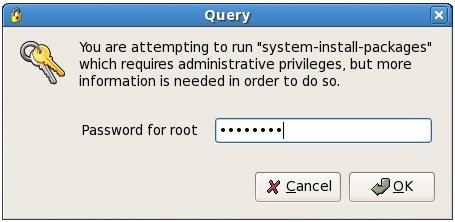
When prompted for your root password, enter it and click OK.
Select Applications from the left column, and then Sound and Video from the right column. Make sure to place a check in the Sound and Video entry. Click the Optional packages button.
Now you’ll have to fire up your web browser and head to (Update: link doesn’t work, search Google for: xmms-mp3-1.2.10-16.fc5.i386.html). On this page, download the file named xmms-mp3-1.2.10-16.fc5.i386.rpm. It should work with any version of Fedora higher than 4 (for me it worked in 6). Once its finished downloading, double-click it.
Again you’ll be prompted for your root password. Enter it in the space provided and click OK.
2020 Update: This is a 32bit app, which means it will only work in versions of macOS prior to High Sierra (10.13). With that said, the app still works and it’s fun if you have an old Mac.
I recently stumbled across a terrific little program called Wallsaver, which lets you change your desktop wallpaper into any of your installed screensavers. Keep reading for details and screenshots…
This somewhat brief tutorial will guide you in installing Wine, and then using it to install Windows applications. Though the steps and screenshots are specific to Ubuntu Linux, they will be very similar for most Linux/*nix distributions. …
Please note: As of macOS version 10.11 (El Capitan), Disk Utility no longer comes with the option to repair disk permissions. macOS has implemented a different method to keep disk permissions set the way they should be. This guide is still completely accurate as long as you’re using a version of macOS that’s earlier than 10.11.
If you’re here because of a problem with your Mac and you’re using a version of macOS that’s newer than 10.11, you may want to check out the suggestions in this guide instead of trying to repair disk permissions.
If you find your Mac is running a bit more sluggish than usual, or a program you frequently use starts behaving oddly, you might need to repair your disk permissions. This tutorial will guide you in doing just that. …
This short but detailed tutorial will show you how to create a favicon.ico (that icon in your address bar – ex. Simplehelp’s favicon.ico is ) for your own site. …
Although this was published way back in 2007 and at one point was “10 tips”, the 5 remaining tips will still work – although most will not work with Catalina (macOS 10.15). So if you’re using an older version of macOS (OS X) – these will be super helpful! …
Much like everything else about macOS, connecting to a wireless network is painfully easy. But if you’re not familiar w/ macOS yet or need to walk someone else through it, the following steps will help you connect a Mac to a wireless network. …
Perhaps you prefer to use Ad-Aware and/or Spybot to keep your PC spyware-free. Perhaps you want to free up some system resources. Perhaps you just want to know how.. …